Know what your BMW
needs next.
Pick your model and engine. SixLine builds the maintenance schedule, including what the dashboard doesn’t count down, and reminds you before each item is due.
- Free for 1 car, forever
- No account required
- Works offline
- Export your data anytime
iPhone today. The Android version is on the way.
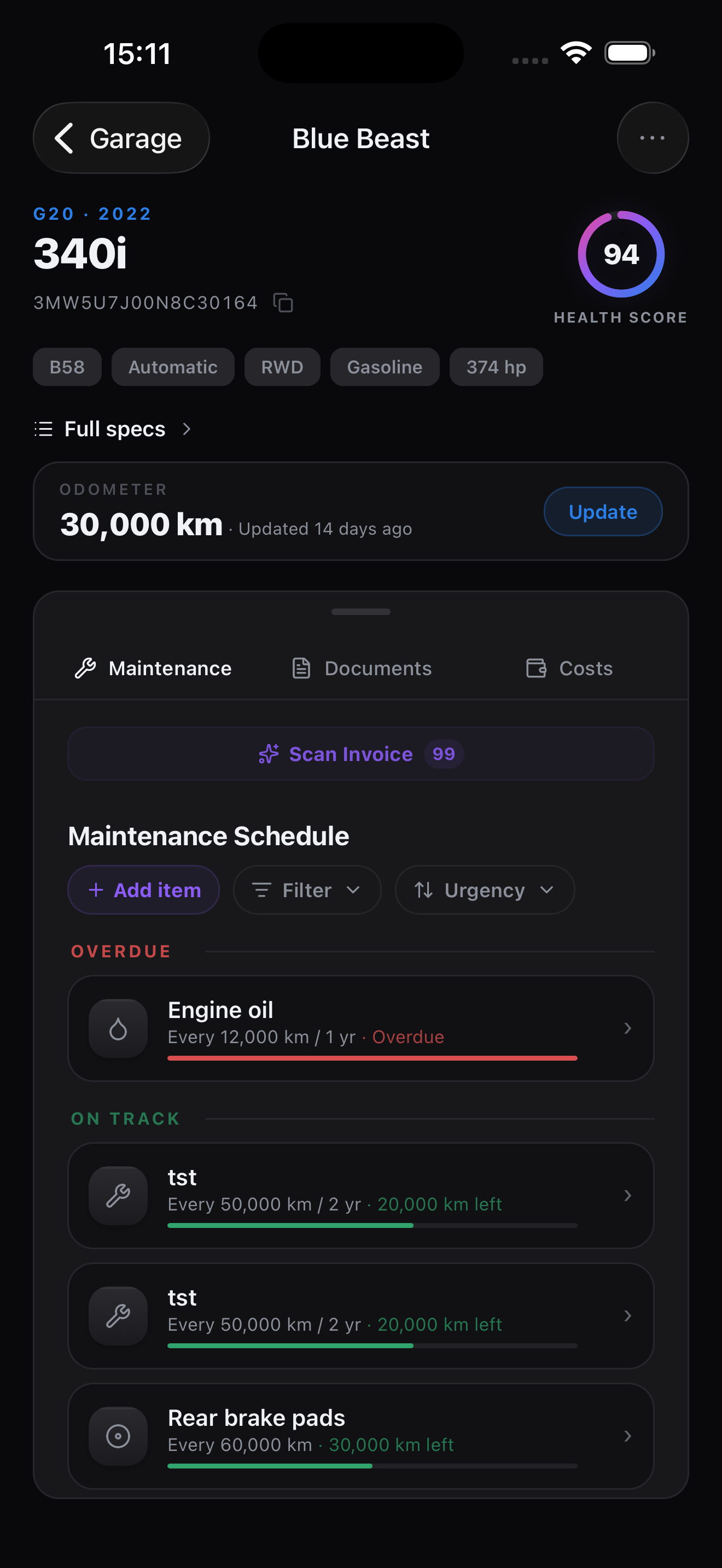
A notebook doesn’t remind you.
The dashboard doesn’t count everything.
| What you need | Notebook or spreadsheet | The car’s service display | SixLine |
|---|---|---|---|
| Intervals for your engine | You look them up yourself | Only the items BMW schedules | Built in for 131 chassis codes and 62 engines. Every interval can be changed. |
| Gearbox and differential oil, coolant | Only if you think of them | Usually not counted | Counted, as estimates you can edit |
| Reminders | None | Only for the items it counts | Notifications by distance and by date, plus a Home Screen widget |
| Invoices, costs and documents | Typed and filed by hand | Not kept | Scanned or typed, all in one place |
| History for a buyer | You put it together | Only what a workshop logged | A PDF report from your records |
The car’s own display always comes first. SixLine adds what it leaves out.
Your engine decides
the schedule.
Three BMWs on one odometer, each on its own plan. Oil service at 11,000 km:
Each car is driven about 15,000 km a year from new. Intervals are estimates; your car’s own service indicator (CBS) comes first.
Photograph the invoice.
Skip the typing.
SixLine reads the services, costs and mileage from a photo or a PDF. One free scan after you sign in, 100 with PRO. You can always type instead.

Snap an invoice or your iDrive screen
SixLine reads it and matches your schedule.

Confirm what it found
Nothing saves without your OK.

Save it to your history
Your confirmed services and mileage update the maintenance record.

Scan or type your VIN
Whichever's faster for you.

Review your car’s details
Generation, engine, transmission and drive type, filled in for you. VIN decode is part of PRO.

Your maintenance starting point
A schedule based on your engine and drivetrain. Adjust it to your car’s needs.
Take a look inside.


Free for one BMW.
Forever.
No subscription and no ads. PRO is an optional one-time purchase.
Free
- 1 vehicle
- Manual maintenance entries
- Service schedules
- Maintenance reminders
- Monthly odometer reminder
- Home Screen widget
- Service history & costs
- Back up & sync your data across devices
- 1 free invoice scan
- 1-page PDF summary
PRO
Pay once. No subscription, no renewal.
- Everything in Free, plus:
- Unlimited vehicles · every BMW you own
- Invoice or iDrive scans · 100 included, no typing
- Full PDF report · every service, expense and document
- Document files backed up · safe if you lose your phone
- VIN decode · 2 included, with factory options and specs
- Your own reminder thresholds
Need more later? Extra VIN decodes (€5 each) and invoice scan packs (€10 / 100 scans) are available right inside the app.
Good to know.
My BMW already shows when service is due. Why would I need SixLine?
Keep following the car: its own service display (CBS) comes first. CBS counts a set of items, such as engine oil, brake fluid and brake pads. It usually does not count gearbox oil, differential oil or coolant, because BMW gives no fixed interval for them. SixLine adds those as estimates you can edit, sends reminders to your phone, and keeps the invoices, costs and documents the car doesn’t store.
Does SixLine connect to my car?
No. It does not read the car through OBD or a BMW account. You enter the odometer yourself, and a scanned invoice or iDrive screen can update it. From those readings SixLine works out how much you drive and shows the month each item is likely to come due.
Which BMWs does it cover?
131 chassis codes and 62 engines, from classics such as the E30 to the current G-series, including M cars and the electric i models. You pick chassis, engine, gearbox and drive, and the plan follows from that. Anything missing from the plan can be added as your own item. MINI and motorcycles are not covered.
Are these BMW’s official intervals?
No, they are estimates. For cars covered by BMW’s US maintenance booklets, SixLine starts from the printed figures; everything else is SixLine’s own preventive estimate. You can change any interval, and your car’s own service display (CBS) always comes first. SixLine is independent and not affiliated with BMW AG.
What is free, and what does PRO add?
Free for one BMW, with no time limit: the maintenance plan, reminders, service history and costs, documents, the Home Screen widget, a one-page PDF summary and one invoice or iDrive scan after you sign in. PRO is a one-time €39.99 purchase with no subscription. It adds unlimited vehicles, 100 scans, 2 VIN decodes, the full PDF report, backup of document files and custom reminder settings. With one car you may never need it. It pays off for a second BMW, a stack of old invoices, or the full report when you sell.
Do I need an account or an internet connection?
No. Your records are stored on the iPhone, and you can view them and add services offline, without an account. Signing in adds backup and sync across your devices. Scanning, VIN decode and buying PRO need both an account and a connection.
Where is my data kept, and can I export it?
On your iPhone. If you sign in, your records are also backed up to your account on servers in the EU; backing up attached files needs PRO. Export is free and needs no account: Settings → Export my data saves all your vehicles, service history, expenses and document details to one JSON file (attached files are listed, not included). Each car’s service history and expenses also export to a CSV file from the car’s ⋯ menu. You can delete your garage or your account from Settings. Details are in the Privacy Policy.
What happens to an invoice I scan?
The photo or PDF is sent to an AI service that reads the services, costs, date and mileage. The app asks for your permission before the first scan. You then see what it found, and nothing is saved until you confirm. Scanning is optional: you can always enter a service by hand.
Which iPhones does it run on? Is there an Android version?
SixLine needs an iPhone with iOS 17 or later. The Android version is on the way.

Add your BMW. See what’s due.
Free for one car, with no account.